
AI automation

Workflow automation for the steps nobody should be doing by hand

Copying a form into a spreadsheet. Renaming a file and emailing it on. Chasing an approval. None of it is difficult, all of it takes time, and it is the first thing to break when somebody is on leave.
  • Free first call
  • Written proposal before any work
  • One person to talk to
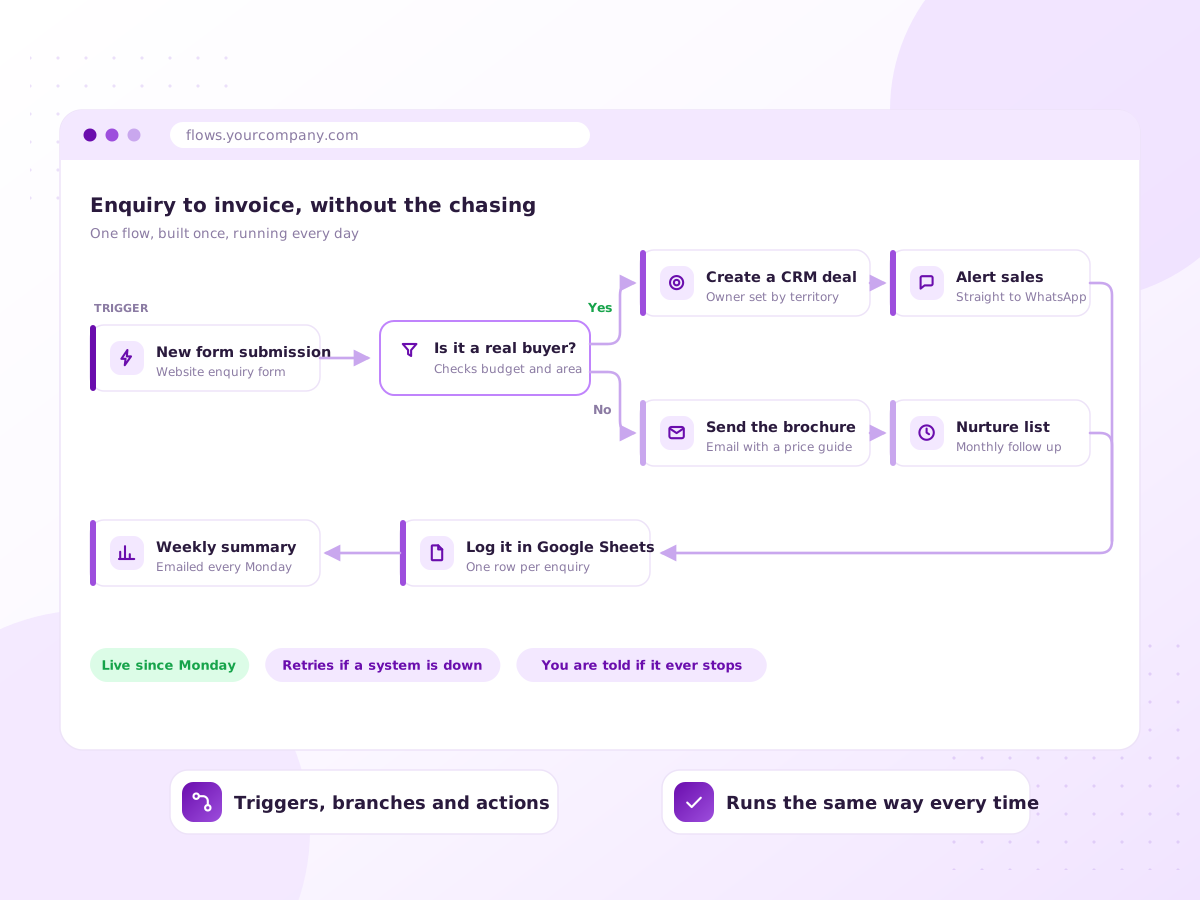
Illustration of a workflow connecting a form, a CRM, email and a spreadsheet automatically

The copying and pasting nobody put in a job description

Someone opens a form submission, copies the name into the CRM, copies it again into a spreadsheet, then types the confirmation email. It just never ends.

An automation watches for that trigger and does the steps that always follow. Not all of it needs AI, and we will say so. Most of what eats your week is a plain if-this-then-that job.

We mostly build in n8n, which can be self-hosted, so your data stays on your server and your cost does not climb with volume.

Sound familiar?

If somebody does this every single morning

These are the jobs clients bring us first. Rarely the most interesting work, almost always the most repeated.

  • Copying the same data between two systems daily
  • Creating folders, documents or invoices by hand
  • Chasing approvals over email and losing track
  • Weekly reports assembled by hand from three places
  • Onboarding from a paper checklist
  • Processes only one person knows how to run
What’s included

The mapping matters more than the building

Connecting two tools takes an afternoon. These are the parts that decide whether it still runs a year from now.

Process mapping

We write down what happens today, including the exceptions people work around.

Tool to tool connections

Forms, CRM, email, calendars, accounting and storage, so data is entered once.

AI steps where needed

A model only for steps that need reading or deciding. The rest stays plain logic.

Error handling

Failures are retried, logged and reported, never silently dropped.

Approval steps

A human approval wherever money, customers or contracts are involved.

Self-hosted option

n8n on your own server, so cost does not scale with task count.

How it works

One real case, followed end to end

  1. 1

    Walk the process

    We follow one real case through your business and note every step and handoff.

  2. 2

    Pick the first three

    Most repetitions, fewest exceptions. Quick wins build trust for the harder ones.

  3. 3

    Build in a test space

    Workflows built against test data, with logging from the first version.

  4. 4

    Run in parallel

    The automation runs alongside the manual process for a while, so you can compare.

  5. 5

    Hand over and document

    Your team gets a written map and learns how to pause it, not just use it.

What you get

  • A written map of each process, before and after
  • Working automations in your own n8n or Make account
  • Error alerts sent to a channel your team watches
  • Human approval steps wherever they matter
  • Documentation of every workflow and its trigger
  • Support for when a tool changes its API

Tools and platforms we work with

n8n Make Zapier Airtable Google Workspace Microsoft 365 Slack Python

We pick tools that suit your budget and team. If you already use something, we work with it.

Who it’s for

Back office teams buried in steps

Professional services

Client onboarding, document and billing routines that repeat.

Manufacturing and trade

Order to dispatch processes living in email and spreadsheets.

Agencies

Client reporting, approvals and project setup, every month.

Operations and admin teams

Work that grows with headcount instead of revenue.

Why work with Ratawa Technologies

  • We say when a simple automation beats an AI one, then build the simple one.
  • Every workflow logs what it did, so failures are visible.
  • You get a written map of each process, not just a working flow.
  • Workflows live in your accounts, documented, not locked to us.

What affects the cost

Priced per workflow, or as a monthly build and support arrangement. It depends on:

  • How many workflows, and how many steps each has
  • How open your tools are, and where a workaround is needed
  • Self-hosted, or on a paid platform plan
  • Platform subscriptions and task charges

You get a fixed written quote after the first call. No surprise charges.

FAQ

Workflow Automation: common questions

Zapier is easiest to pick up and dearest at volume. Make gives more control. n8n is the most flexible and runs on your own server.
It will break eventually, because tools change. Every workflow logs its runs, retries sensible failures and alerts a channel your team watches.
Often not. If a rule can be written out clearly, plain logic is cheaper and more predictable.
Sometimes, through file exports, email parsing or browser automation. These are fragile and we say so first.
You do. They are built in your account and documented. Nothing switches off if you leave.
A straightforward workflow can be live within days. Larger ones are built in stages.

What does your team do every single morning?

Walk us through one repetitive process. We will tell you whether it is worth automating and what it would take.