
AI automation

Agents that read your paperwork so your team does not have to

Invoices, delivery notes, forms, contracts and the twenty emails a day with a PDF attached. Somebody is retyping all of it into another system, and they are the one who gets blamed when a digit goes missing.
  • Free first call
  • Written proposal before any work
  • One person to talk to
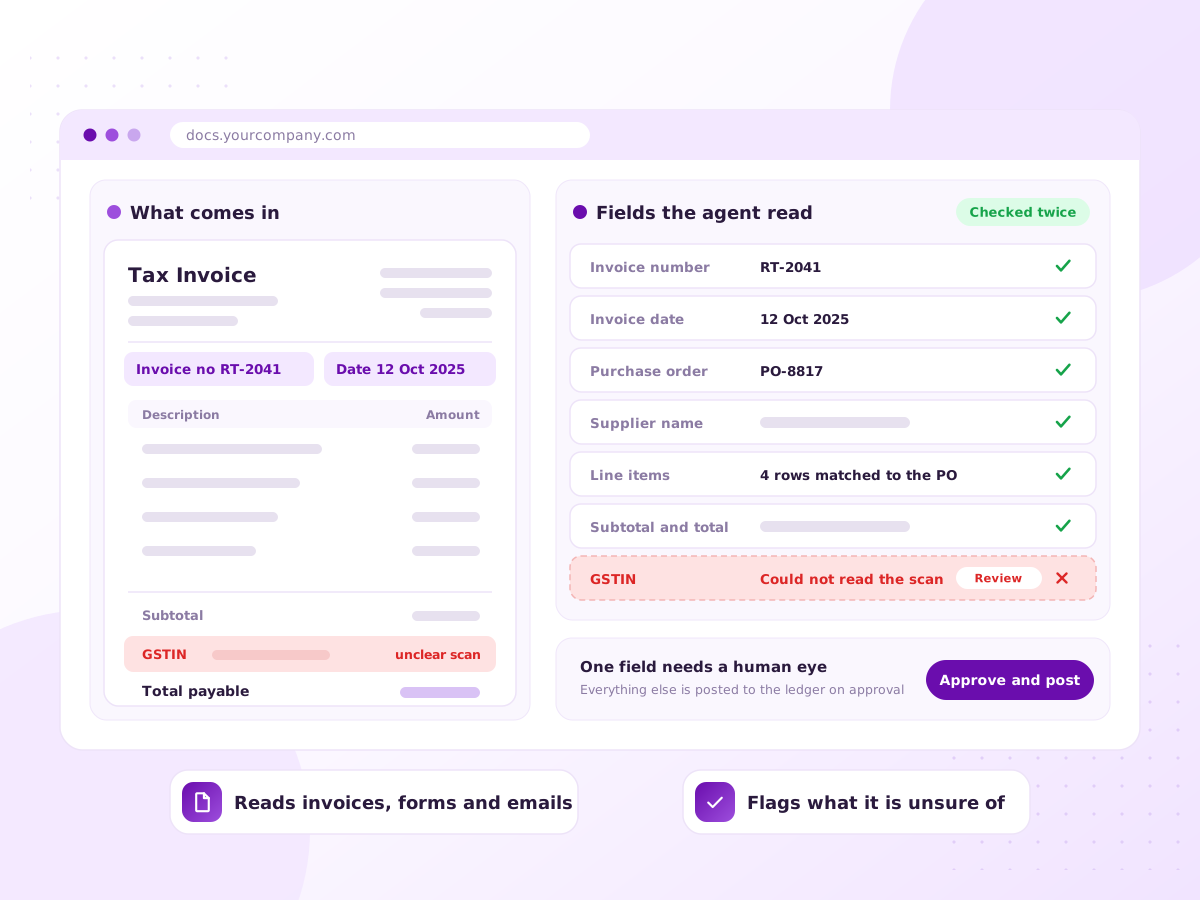
Illustration of invoices and forms being read by an AI agent and turned into structured data

The stack of PDFs that becomes somebody’s whole morning

A supplier invoice lands as an email attachment. It gets opened, read and keyed into the accounting system one field at a time. Then the next one.

A document agent takes the same paperwork in whatever form it arrives and pulls out the fields you need. This used to be OCR with templates, which broke whenever a supplier changed layout. A model reads a layout it has never seen.

Accuracy is the whole conversation, so we build in checks: totals must add up, supplier names must match a record. Anything that fails goes to a person.

Sound familiar?

The data entry nobody has ever costed

It never appears as a line in your accounts. It is constant, invisible, and it grows with your order book.

  • Supplier invoices keyed into accounting by hand
  • Orders that arrive as PDFs and get retyped
  • Somebody filing every attachment by hand
  • Forms filled in on paper and typed up later
  • Contracts checked by eye for dates and renewals
  • A slow month end because data entry is behind
What’s included

From clean PDFs to handwriting

Each document type gets its own validation rules and review threshold. Nothing is one generic pile of paper.

Invoices and bills

Read from email or a folder, with date, tax and lines matched to the purchase order.

Orders and delivery notes

Purchase orders and dispatch paperwork turned into records in your ERP.

Email and attachment triage

Incoming mail read, classified, routed and filed, with the useful data lifted out.

Forms and handwriting

Scanned and photographed forms processed, with low-confidence values flagged.

Validation rules

Arithmetic checks, duplicate detection and supplier matching before anything is written.

Review queue

A screen showing the document and the values together, so a person corrects in seconds.

How it works

We measure the accuracy before you commit

  1. 1

    Collect real samples

    A batch of your actual documents, including the ugly ones. Those decide whether this works.

  2. 2

    Define the fields

    Exactly which values you need, in what format, and what counts as valid.

  3. 3

    Build and measure

    The agent runs across your samples. You see accuracy per field before going further.

  4. 4

    Review queue first

    Everything passes through human review at the start, which shows where it struggles.

  5. 5

    Raise the threshold

    As accuracy proves out, confident documents post automatically.

What you get

  • An agent reading documents from email, a folder or a scanner
  • Extracted data pushed into your accounting, ERP or database
  • Validation rules and duplicate checking
  • A review queue for anything uncertain
  • Measured accuracy per field, reported honestly
  • The original document linked to every record

Tools and platforms we work with

Claude API OpenAI API Google Document AI Azure Document Intelligence n8n Python Tally and ERP integrations Google Drive

We pick tools that suit your budget and team. If you already use something, we work with it.

Who it’s for

Businesses where paperwork arrives daily

Manufacturing and distribution

High volumes of purchase orders, invoices and delivery notes.

Accounting and finance teams

Payable work that scales with transaction count, not value.

Logistics

Dockets, manifests and proof of delivery paperwork.

Professional services

Firms processing client forms, contracts and compliance documents.

Why work with Ratawa Technologies

  • We measure accuracy on your own documents before you commit.
  • Anything uncertain goes to a person, not into your accounts.
  • Every posted record links back to the original document.
  • Documents and extracted data stay inside your systems.

What affects the cost

Priced as a build plus a cost per document processed. The factors:

  • Document types and how varied their layouts are
  • Monthly volume
  • Which system the data lands in, and how open its API is
  • Model and OCR usage, paid to the provider

You get a fixed written quote after the first call. No surprise charges.

FAQ

Document & Data AI Agents: common questions

That depends on your documents, which is why we measure it on your samples first. Clean PDFs are read very reliably. Poor scans and handwriting are harder.
They go to the review queue with whatever was extracted, so a person corrects rather than retypes.
Yes, and that is the main reason to use a model rather than template OCR. You do not need a template per supplier.
Usually, through the API or a supported import format. Where a system is closed, we tell you what the workaround costs.
With the right checks, yes. Totals are verified, duplicates caught, and payment approval stays with a person.
A document is usually processed within seconds of arriving. The limit is your review step.

Send us ten of your worst documents

Share a sample batch, including the badly scanned ones. We will run them and show you the real accuracy before you spend anything.