
AI agents

Support agents that answer from your documents, not from guesswork

A large part of every support queue is the same thirty questions. An agent trained on your help centre, policies and order data closes those in seconds and leaves your team the ones that genuinely need a person.
  • Free first call
  • Written proposal before any work
  • One person to talk to
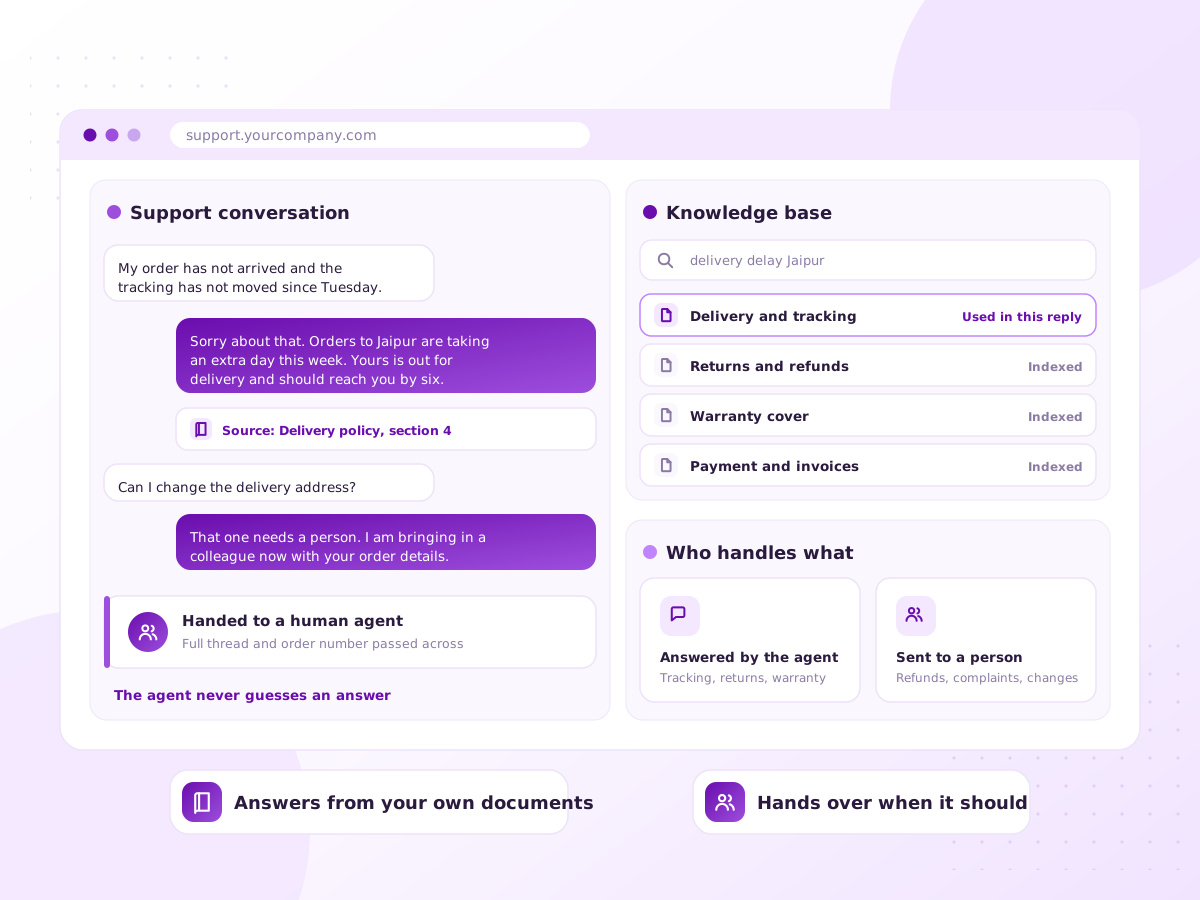
Illustration of a support inbox where an AI agent resolves routine tickets and escalates the rest

How many of today’s tickets have you answered before?

Open the queue and read the oldest one. Somebody probably answered that exact question last week, in almost the same words.

A support agent sits in your help desk. It reads the ticket, finds the answer in your documentation, checks the order where it needs to, and replies. When unsure it escalates with a summary attached.

You can also run it in draft mode, where the agent writes and a person presses send. Many teams stay there for the trickier queues.

Sound familiar?

Your team can name these tickets already

Ask anyone on the desk which questions they are tired of answering. They will not need to think.

  • The same questions about delivery and returns all day
  • First response times stretch to hours at peak
  • Tickets arrive out of hours and sit until morning
  • Two agents give two answers to one question
  • Your help centre exists but nobody reads it
  • Seasonal spikes mean hiring temporary staff
What’s included

Inside the help desk your team already uses

No new tool to learn and no second inbox to watch. The agent works where tickets already land.

Trained on your content

Help centre articles, policies and resolved tickets, indexed so answers link to the source.

Connected to your systems

Order lookups, subscription status and tracking, so answers are specific.

Triage and routing

Every ticket tagged by topic, urgency and sentiment, then sent to the right queue.

Draft mode

The agent writes, your team approves. A safe start, and useful permanently on hard queues.

Escalation rules

Complaints, refunds, legal threats and anything uncertain go to a human.

Quality reporting

Resolution rate, escalation rate, and which help articles are missing.

How it works

Draft mode first, automatic later

  1. 1

    Read the queue

    We group your past tickets. This shows which share of the queue is automatable.

  2. 2

    Fix the source material

    Where answers are missing or contradict, we flag them. An agent is only as good as what it reads.

  3. 3

    Build and connect

    Built into Zendesk, Freshdesk, Intercom or your own inbox, with the lookups it needs.

  4. 4

    Draft mode first

    It writes, your team checks, and we measure how often the draft went out unchanged.

  5. 5

    Release gradually

    Automatic replies start with the safest ticket types and widen from there.

What you get

  • An analysis of your queue and what can be automated
  • A support agent answering from your approved content
  • Order and account lookups inside the reply
  • Escalation to your team with full context
  • Tagging, routing and sentiment on every ticket
  • Monthly reporting on resolution and escalation

Tools and platforms we work with

Zendesk Freshdesk Intercom Claude API OpenAI API n8n Shopify WhatsApp Business API

We pick tools that suit your budget and team. If you already use something, we work with it.

Who it’s for

Queues we are usually called into

E-commerce

Where is my order, returns and exchanges, at volume.

SaaS products

How-to questions, billing queries and onboarding help from your docs.

Travel and hospitality

Booking changes and pre-arrival questions across time zones.

Finance and insurance

Routine queries handled, regulated matters sent to a person.

Why work with Ratawa Technologies

  • The agent escalates when unsure instead of inventing an answer.
  • Start in draft mode and automate only when the numbers justify it.
  • Asking for a human works immediately, every time.
  • Your help desk, content and customer data stay in your accounts.

What affects the cost

Priced as a build plus a monthly running cost, depending on:

  • Ticket volume and how many channels you support
  • How much documentation needs rewriting first
  • Number of systems the agent looks into
  • Help desk and model usage charges

You get a fixed written quote after the first call. No surprise charges.

FAQ

AI Customer Support Agents: common questions

It varies, so we will not quote a number before looking. We analyse your past tickets and tell you which categories are genuinely automatable.
It answers from your approved content with the source attached, and escalates rather than guesses. Refunds never go out automatically.
Yes, inside your existing help desk, so the history stays on the ticket. Email and WhatsApp are also possible.
They do when the agent is a dead end. Ours are built so asking for a human works at once.
The agent sees only the fields it needs. Sensitive fields can be masked, and for regulated work we keep an audit trail.
Most clients keep the same team, stop the queue growing, and move people onto harder work.

Find out what your queue really looks like

Share an export of your last few hundred tickets. We will come back with what is automatable, what is not, and why.